BasketProductLineFieldExtension Class
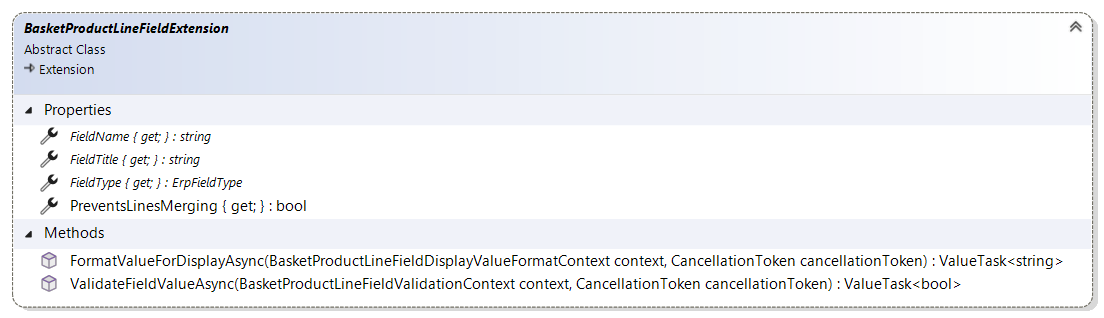
The BasketProductLineFieldExtension class serves as the base class for implementing custom basket product line field extensions in Sana Commerce Cloud. It provides the foundation for creating custom fields that can be used during the checkout process.
Important
ERP customization is required in order to handle custom basket product line fields.
Properties
FieldName
public abstract string FieldName { get; }
The name of the product line field. This identifier is used to reference the field throughout the system.
FieldTitle
public abstract string? FieldTitle { get; }
The title of the product line field. This is the display name shown to users in the interface. Can be null if no title is needed.
FieldType
public abstract ErpFieldType FieldType { get; }
The type of the product line field. Defines the data type and behavior of the field.
See ErpFieldType reference for available field types.
PreventsLinesMerging
public virtual bool PreventsLinesMerging { get; }
Gets a value indicating whether the same checkout item line but with different field values should be added to the basket as separate lines and not merged with existing ones.
If your extension requires that the lines should not be merged, override this property and return true:
public override bool PreventsLinesMerging => true;
Note
When PreventsLinesMerging is set to true, additional ERP customization is required. The field value must be returned to Sana during basket calculation and order retrieval for the lines merging prevention to work correctly.
By default, this property returns false, meaning lines can be merged.
Methods
ValidateFieldValueAsync
public virtual ValueTask<bool> ValidateFieldValueAsync(BasketProductLineFieldValidationContext context, CancellationToken cancellationToken)
Validates the product line field value. This method can be overridden to implement custom validation logic.
Parameters
context: ABasketProductLineFieldValidationContextinstance containing the field value to validate.cancellationToken: The cancellation token.
Returns
A ValueTask<bool> indicating whether the validation passed (true) or failed (false).
By default, this method returns true, meaning validation passes. Override this method to implement custom validation rules.
FormatValueForDisplayAsync
public virtual ValueTask<string?> FormatValueForDisplayAsync(BasketProductLineFieldDisplayValueFormatContext context, CancellationToken cancellationToken)
Formats the field value for display. This method can be overridden to customize how the field value is displayed to users.
Parameters
context: ABasketProductLineFieldDisplayValueFormatContextinstance containing the field value to format.cancellationToken: The cancellation token.
Returns
A ValueTask<string?> representing the formatted field value as a string. Returns null if the value cannot be formatted.
By default, this method returns the string representation of the field value using context.Value?.AsObject()?.ToString().
Example Usage
Here's an example of implementing a basket product line field extension:
public class CustomStringProductLineFieldExtension : BasketProductLineFieldExtension
{
    public override string FieldName => "StringField";

    public override string? FieldTitle => Api.GetSanaText("StringFieldTitle", "String field");

    public override ErpFieldType FieldType => ErpFieldType.String;

    public override ValueTask<bool> ValidateFieldValueAsync(
        BasketProductLineFieldValidationContext context,
        CancellationToken cancellationToken)
    {
        var value = context.Value?.AsString()?.Trim();

        if (string.IsNullOrWhiteSpace(value)
            || value.Length < 3)
        {
            return ValueTask.FromResult(false);
        }

        return ValueTask.FromResult(true);
    }

    public override ValueTask<string?> FormatValueForDisplayAsync(
        BasketProductLineFieldDisplayValueFormatContext context,
        CancellationToken cancellationToken)
    {
        var value = context.Value?.AsString() ?? string.Empty;
        var formattedString = value.Trim().ToLower();

        return ValueTask.FromResult<string?>(formattedString);
    }
}