Extension.Api.DataFiles reference
This article provides reference material about extension file system API. Every extension has
Api property which contains DataFiles property which provides extension
developer with possibility to use file system from within extension.
File system API uses isolated storage. Isolated storage is a separate folder for each extension where extensions can save data. Each extension has access only to its folder. All isolated storage folders are located in "/application_folder/@data/packages-data".
Methods
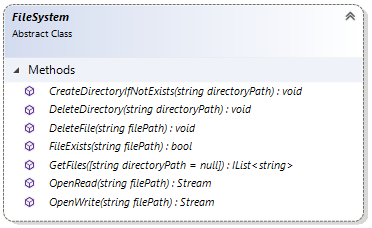
CreateDirectoryIfNotExists
Creates the directory if it does not exist in the extension's file storage yet.
Api.DataFiles.CreateDirectoryIfNotExists("new-folder");
DeleteDirectory
Deletes the directory from the extension's file storage.
Api.DataFiles.DeleteDirectory("folder-to-delete");
DeleteFile
Deletes the specified file from the extension's file storage.
Api.DataFiles.DeleteFile("file.txt");
FileExists
Returns the boolean value whether the file exists in the extension's file storage or not.
bool fileExists = Api.DataFiles.FileExists("file.txt");
GetFileInfo
Returns DataFileInfo - information about data file without opening a stream, useful for rotation checks.
DataFileInfo properties
| Property | Type | Description |
|---|---|---|
Exists |
bool |
A value indicating whether the file exists. |
LengthBytes |
long |
The file length in bytes. |
ModifiedDate |
DateTime? |
The last modified date when the file exists; otherwise null. |
var info = Api.DataFiles.GetFileInfo("logs/audit.log");
if (info.Exists && info.LengthBytes > 10 * 1024 * 1024)
{
    // archive and start a new audit log file
}
GetFiles
Returns the list of file names from the extension's file storage by specified fileName parameter.
For example, if fileName equals "file" then this method will return all files with
such name("file.txt", "file.doc", etc.).
var files = Api.DataFiles.GetFiles("file");
OpenAppend
Opens a write-only, forward-only stream and creates the file if missing. Use this method for files that grow over time.
using var stream = Api.DataFiles.OpenAppend("logs/audit.log");
using var writer = new StreamWriter(stream, leaveOpen: true);
writer.WriteLine($"Log: [{DateTime.UtcNow:O}] Product {productId} added to list.");
writer.WriteLine($"Error: {ex.GetType().Name}");
writer.WriteLine($"Exception: {ex.Message}");
Note: Azure Append Blobs allow up to 50,000 append blocks. Prefer batching writes in one using block, and rotate files by size (see GetFileInfo). If the file was originally created with OpenWrite, OpenAppend transparently converts it to an Append blob and preserves content.
OpenRead
Opens an existing file from the extension's file storage for reading.
Returns Stream.
using (var stream = Api.DataFiles.OpenRead("file.txt"))
{
    string data;
    using (var sr = new StreamReader(stream))
        data = sr.ReadToEnd();
}
Tip: Set ContentLenght from GetFileInfo before streaming. OpenRead is forward-only; pipe directly to context.Response.Body with CopyToAsync to avoid buffering.
var filePath = "logs/audit.log";
var info = Api.DataFiles.GetFileInfo(filePath);
if (!info.Exists)
{
    context.Response.StatusCode = 404;
    return;
}

context.Response.ContentType = "text/plain";
context.Response.ContentLenght = info.LengthBytes;

using var stream = Api.DataFiles.OpenRead(filePath);
await stream.CopyToAsync(context.Response.Body, cancellationToken);
OpenWrite
Opens an existing file from the extension's file storage or creates a new file for writing.
Returns Stream.
If your file already contains data that you don't need anymore then you can delete it and open for writing again.
Api.DataFiles.DeleteFile("file.txt");

using (var stream = Api.DataFiles.OpenWrite("file.txt"))
{
    using (var sw = new StreamWriter(stream))
        sw.Write("Hello world!");
}
If your file already contains data and you want to append data to it then you can use the following code example that sets the position of the stream to the end of file before writing to it.
using (var stream = Api.DataFiles.OpenWrite("file.txt"))
{
    stream.Seek(0, SeekOrigin.End); // sets the current position of this stream to to the end of the file

    using (var sw = new StreamWriter(stream))
        sw.Write("Hello world!");
}
Note: OpenWrite can return a non-seekable stream in production (Azure Blob Storage). That breaks append-only use cases (audit logs, rolling files) unless you download and re-upload the whole file. In such scenario, use OpenAppend method.