How Sana performs upgrades for extension add-ons' data
Assuming there is an extension add-on that uses some of the above data entities. Let's see how Sana Commerce Cloud executes the flow.
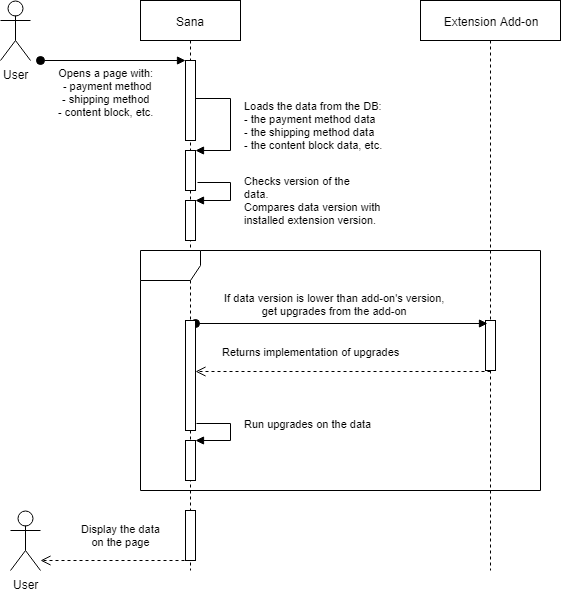
In simple words, the flow is approximately the following:
- At some point Sana Commerce Cloud loads a data entity from the database;
- The data entity contains its extension's version;
- Sana Commerce Cloud checks whether the data version matches current extension add-on's version;
- If the data version is lower than the add-on's version:
- Sana Commerce Cloud gets implementation of upgrades for this data entity from the add-on;
- Sana Commerce Cloud runs the upgrades on this data entity in-memory;
- Upgraded data entity is returned back to the flow;
- Otherwise, if the data version is the same as the add-on's version:
- No upgrade needed, just continue using the entity as it is.
As you can see from the flow, the only thing needed from the extension add-on is to provide upgrade implementation. The rest will be done by Sana Commerce Cloud itself.
Data entity models
In the add-on you usually have model classes for the data entities. For example,
for add-on's configuration you have a class inherited from ExtensionConfiguration
abstract class. Something like this:
public class MyExtensionConfiguration : ExtensionConfiguration
{
    // some properties here
}
For payment or shipping method settings you'll also have a class which is a model for data
entity, inherited either from PaymentMethodSettings or from ShippingMethodSettings
respectively, like this:
public class MyPaymentMethodSettings : PaymentMethodSettings
{
}

OR

public class MyShippingMethodSettings : ShippingMethodSettings
{
}
The same goes for content blocks. For a content block you'll have a model class for it,
inherited from ContentBlockModel abstract class:
public class MyContentBlockModel : ContentBlockModel
{
}
From old model to new model
Taking into account that for every data entity type we have a model class, the upgrade implementation for your extension narrows down to the following points:
- Provide "old" data entity model;
- Provide "new" data entity model;
- Implement upgrade procedure which takes the "old" model as input and returns the "new" model as output.
Basically, that's it: this is the high level overview of how upgrades are implemented in Sana Commerce Cloud Extension points framework.

Cascading versions
Obviously, your extension will go through several subsequent version releases during its lifetime. Upgrades should be implemented in cascading approach. For example, assuming you have released four versions of your extension already:
- 1.0
- 1.1
- 1.2
- 2.0
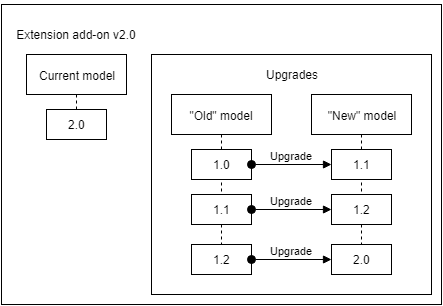
Every time you release a new version where the format of your data has been changed, you may need to include a new upgrade from previous version to current version. Thus, upgrades will be accumulating in your extension with every release. Or in other words, every new version of the extension add-on contains all previous upgrades. Below is the example of it.
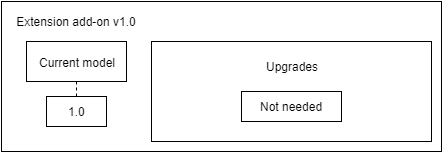
Extension version 1.0
Obviously, if this is our first release of the extension add-on, then no upgrades are needed.
This is what is included in our extension add-on in this case:
- Extension version 1.0
- No upgrades.
Extension version 1.1
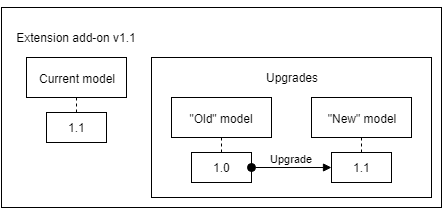
Now that we have the next release, we may want to implement upgrades from 1.0. For this we need to copy our data entity models from source code of version 1.0 as "old" models. And then also copy current data entity models from current 1.1 source code as "new" models.
Now our extension add-on includes the following:
- Extension version 1.1:
- Upgrade from 1.0 to 1.1 implemented:
- "Old" data entity model(s) are models copied from 1.0 source code.
- "New" data entity model(s) are models copied from current 1.1 source code.
- Upgrade from 1.0 to 1.1 implemented:
Extension version 1.2
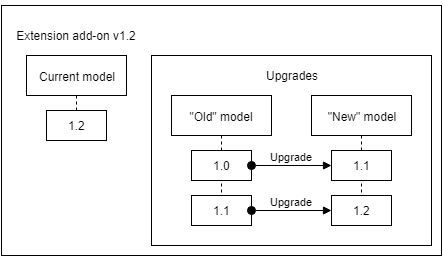
Another release - another upgrade needed, this time we need to implement upgrades from 1.1 to 1.2 and also include previous upgrade. Once again, for 1.1 => 1.2 upgrade we just copy models from the source code of 1.1 version as "old" models and we copy models from current 1.2 source code as "new" models. And we also keep previous upgrade.
This is what our extension add-on contains now (in italics are things that come from previous version unchanged):
- Extension version 1.2:
- Upgrade from 1.0 to 1.1:
- "Old" data entity model(s) are models copied from 1.0 source code.
- "New" data entity model(s) are models copied from 1.1 source code.
- Upgrade from 1.1 to 1.2 implemented:
- "Old" data entity model(s) are models copied from 1.1 source code.
- "New" data entity model(s) are models copied from current 1.2 source code.
- Upgrade from 1.0 to 1.1:
Extension version 2.0
Well, you might have guessed by this time. Just copy models from the 1.2 source code as "old" models and copy current models as "new" models and also keep existing previous upgrades.
This is what we end up with:
- Extension version 2.0:
- Upgrade from 1.0 to 1.1:
- "Old" data entity model(s) are models copied from 1.0 source code.
- "New" data entity model(s) are models copied from 1.1 source code.
- Upgrade from 1.1 to 1.2:
- "Old" data entity model(s) are models copied from 1.1 source code.
- "New" data entity model(s) are models copied from 1.2 source code.
- Upgrade from 1.2 to 2.0 implemented:
- "Old" data entity model(s) are models copied from 1.2 source code.
- "New" data entity model(s) are models copied from current 2.0 source code.
- Upgrade from 1.0 to 1.1:
Next step: