Implementing new Product Update Extension
From this article you will learn how to create custom product update extension.
Please use the following reference article to find more details of the extension infrastructure:
About product update and external Product Information Management systems
Product Information Management (PIM) tools centralize product-related data, streamlining the process of updating and managing accurate information across multiple sales and marketing channels such as Sana providing a single source of truth. Using this extension point allows Sana to understand which products have been updated in the external product information management system in a given time period and index them during the product import task run. A custom product update add-on can be built upon this extension point.
Under the hood
Here is a diagram of how the product update flow works in Sana:
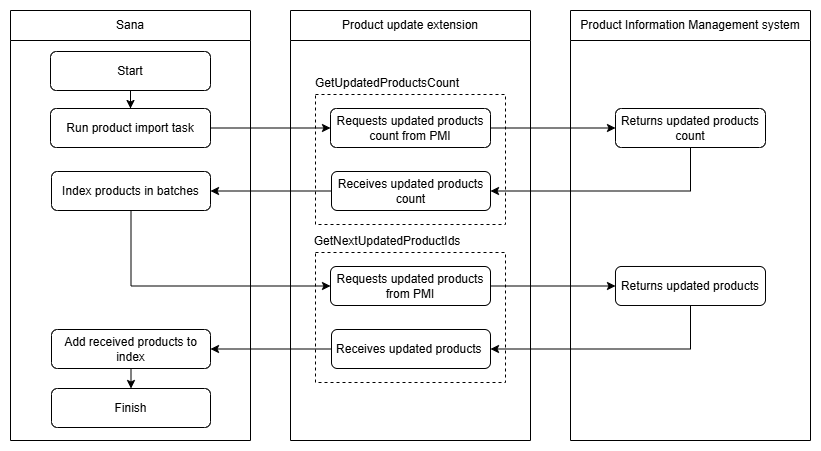
- The process starts by running the product import task. Updating products from external sources is one of the steps of the task. This step starts by retrieving the count of updated products using the GetUpdatedProductsCount extension method. This method in the product update extension should implement the logic that requests and receives this count from the external PIM system.
- The next step is to index the updated products in batches. Sana calls the GetNextUpdatedProductIds extension method which requests and receives updated products from the external PIM system.
- The products updated in the PIM system are added to the index and the task step is completed successfully. All process details are displayed in the task logs.
Implementation
Start with a new project
Create a new add-on project named "Sana.Extensions.CustomProductUpdateExtension" as described in the add-on development tutorial.
The "CustomProductUpdate" constant is the name that will be used in this tutorial, but in real life add-ons it should be replaced with the name of the appropriate service that the add-on integrates with.
Create the extension add-on's class
Create a new class CustomProductUpdateExtension inherited from ProductUpdateExtension.
More information about ProductUpdateExtension you can find in
ProductUpdateExtension reference article.
public class CustomProductUpdateExtension : ProductUpdateExtension
{
}
Implement configuration class
Create a new class Configuration that inherits from the
ExtensionConfiguration and decorate it with the ConfigurationKey attribute.
This class will be used by Sana as a view-model to configure product update
extension in Sana Admin. More details about extension configuration class can be found in
Extension configuration article.
[ConfigurationKey("ProductUpdateConfiguration")]
public class Configuration : ExtensionConfiguration
{
}
Let's add some properties to the Configuration class that may be needed to configure the product update extension.
Note
In this example there are just demo fields, actual fields may vary depending on the addon's needs.
[ConfigurationKey("ProductUpdateConfiguration")]
public class Configuration : ExtensionConfiguration
{
    [Display(Name = "WebServiceUrl", Description = "URL of web service.")]
    [Required]
    [DataType(DataType.Text)]
    public string WebServiceUrl { get; set; }

    [Display(Name = "Separator", Description = "Separator.")]
    [Required]
    [DataType(DataType.Text)]
    public string Separator { get; set; }
}
You can decorate the properties with data annotation attributes since this class is a model for a view. See the Extension configuration article for more details.
Implement the IConfigurable<TConfiguration> interface in the CustomProductUpdateExtension.
Put the Configuration class as a generic type parameter for IConfigurable<TConfiguration>
to indicate that our product update extension should be configured with this class.
public class CustomProductUpdateExtension : ProductUpdateExtension, IConfigurable<Configuration>
{
    public Configuration Configuration { get; set; }
}
Sana will initialize the Configuration property with the configuration settings entered
in Sana Admin on the extension configuration page.
Implement SourceName property
This property must specify the name of the data source by which Sana will reference this product update extension in the system.
So let's add an implementation of the SourceName property to the class:
public class CustomProductUpdateExtension : ProductUpdateExtension, IConfigurable<Configuration>
{
    public Configuration Configuration { get; set; }

    public override string SourceName => "CustomProductUpdate";
}
Implement GetUpdatedProductsCount method
Implement the GetUpdatedProductsCount method of the ProductUpdateExtension class.
Sana calls this method at the beginning of the product import task run. This is to understand how many times the
GetNextUpdatedProductIds method should be called and products indexed in case of batching. If the products
have not been updated in the external product information management software, no indexing is required and a
value of 0 should be returned here. If the value is not returned (returns null), the GetNextUpdatedProductIds
method is called and batches are indexed until the method returns an empty list.
See the GetUpdatedProductsCount method of the product update extension for more details.
public override int? GetUpdatedProductsCount(string? lastProcessedId, DateTime modifiedAfter, DateTime modifiedBefore)
    => FetchUpdatedEntities(modifiedAfter, modifiedBefore).Count;

protected IList<string> FetchUpdatedEntities(DateTime modifiedAfter, DateTime modifiedBefore)
{
    /* Specific data retrieval behavior */
}
Note
The FetchUpdatedEntities method is provided as an implementation idea only, it is not required.
Implement GetNextUpdatedProductIds method
Implement the GetNextUpdatedProductIds method of the ProductUpdateExtension class.
Sana will call this method during the product import task run. This makes it clear which products have been updated in the external product information management software. The returned list of IDs is added to the list to be loaded and indexed.
See the GetNextUpdatedProductIds method of the product update extension for more details.
public override IList<string> GetNextUpdatedProductIds(string lastProcessedId, DateTime modifiedAfter, DateTime modifiedBefore)
{
    var allProductIds = FetchUpdatedEntities(modifiedAfter, modifiedBefore);

    if (lastProcessedId == null)
        return allProductIds;

    return allProductIds
        .SkipWhile(id => !id.Equals(lastProcessedId, StringComparison.Ordinal))
        .Skip(1)
        .ToList();
}

protected IList<string> FetchUpdatedEntities(DateTime modifiedAfter, DateTime modifiedBefore)
{
    /* Specific data retrieval behavior */
}
Note
The FetchUpdatedEntities method is provided as an implementation idea only, it is not required.
Next steps
After the extension is implemented, follow the regular add-on development guides:
- Test the implemented extension
- Assemble the add-on package
- Ensure that the package has been correctly assembled.