Implementing new punchout extension
From this article you will learn how to create custom punchout extension.
Please use the following reference articles to find more details on extensions infrastructure:
- PunchoutExtension reference
- PunchoutLoginRequestContext reference
- PunchoutLoginInfo reference
- PunchoutBasketTransferContext reference
- PunchoutNextAction reference
- PunchoutImportOrderRequestContext reference
- PunchoutInvoicesRequestContext reference
- PunchoutShipmentsRequestContext reference
- PunchoutCreditNotesRequestContext reference
- PunchoutProductsRequestContext reference
- PunchoutPricesRequestContext reference
- PunchoutShippingAddressesRequestContext reference
About punchout extensions
Starting with version 2.0.34 of the extension framework Sana supports integration with procurement systems using new punchout extension point. Custom punchout extensions can be built upon this extension point.
Procurement system is an external application such as SAP Ariba, Jaggaer, Coupa, Microsoft Dynamics, Oracle NetSuite, GEP, etc which is connected to Sana using punchout service like InstaPunchout or any other.
Punchout service is an application that communicates information between Sana and procurement system, it handles the procurement system messages formatted in cXML, OCI or other format and communicates with Sana in JSON format.
User experience
User experience in a punchout flow refers to the journey and interactions users have when accessing supplier's catalog (Sana website) from within their own organization's procurement system. This process involves users selecting items from the supplier's catalog, adding them to their shopping cart, and returning seamlessly to procurement system to complete the purchase.
Users start by accessing their organization's procurement system and initiating a purchase requisition or shopping session. They may navigate to the supplier catalog section and select the option to "punchout" to the external supplier's website.
Example of start punchout session button in the F&O:
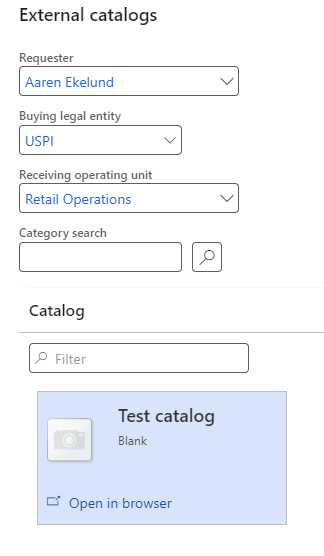
Upon initiating the punchout, user is automatically logged into the Sana website.
Once authenticated, user is directed to the supplier's catalog, where they can search for specific items, navigate categories, view product details, pricing, and availability. Users can add desired items to their shopping cart just like in the regular login session.
Once users have completed their shopping, they initiate the process to return to their organization's procurement system using the "Transfer shopping cart" button on the shopping cart page.
Example of the "Transfer shopping cart" button:
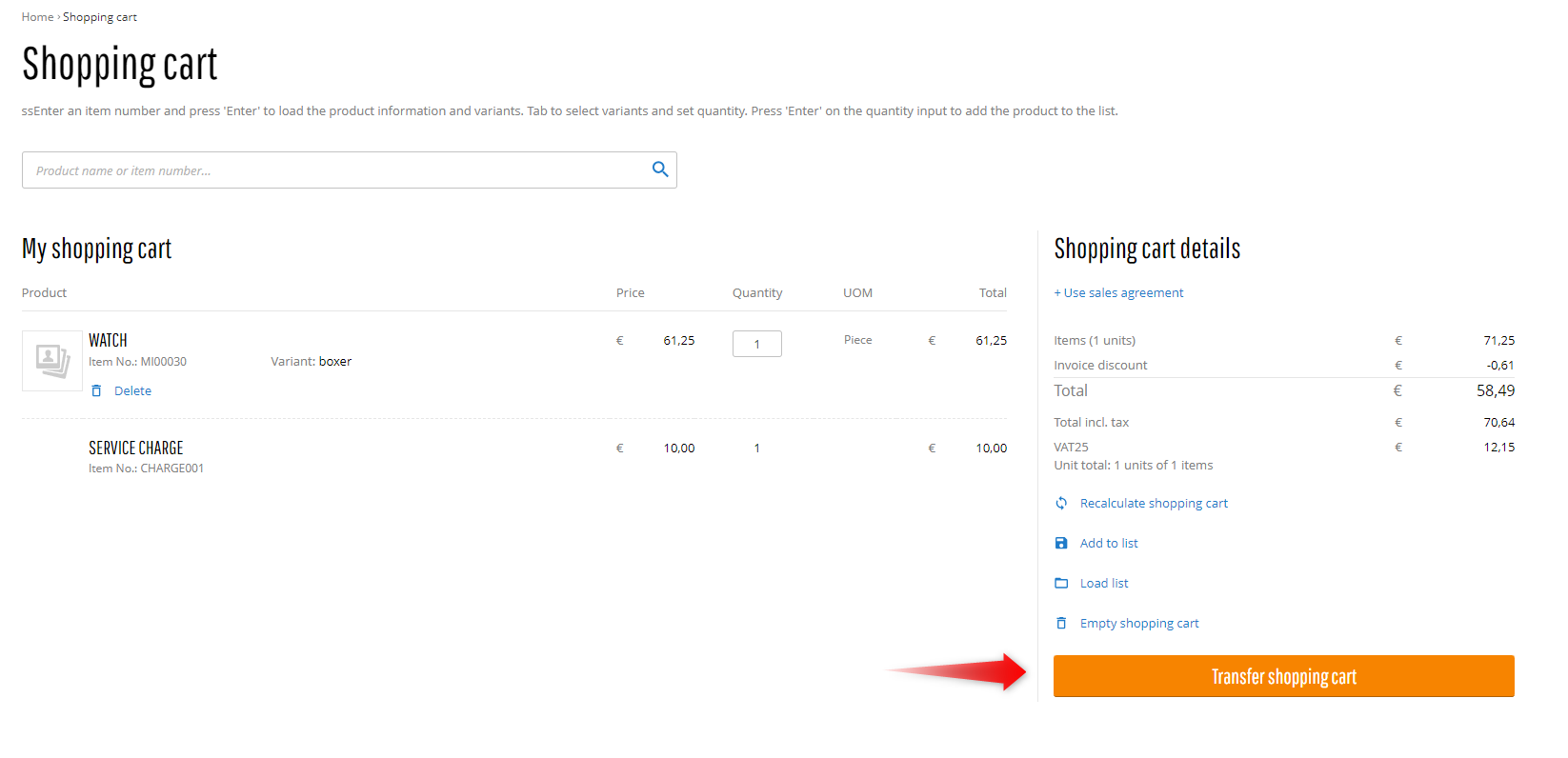
In the procurement system, the selected items from the external supplier's catalog are added to the user's purchase requisition.
Upon finalizing the purchase requisition or order within the procurement system, users can receive confirmation of their order.
After the order has been processed and fulfilled by the supplier, they can generate an invoice for the purchased items. The ivoices then can be transfered to the supplier's procurement system. The same is supported for shipments and credit notes.
Under the hood
Now let's get a quick overview of what happens under the hood. Here is a diagram of how punchout flow works in Sana:
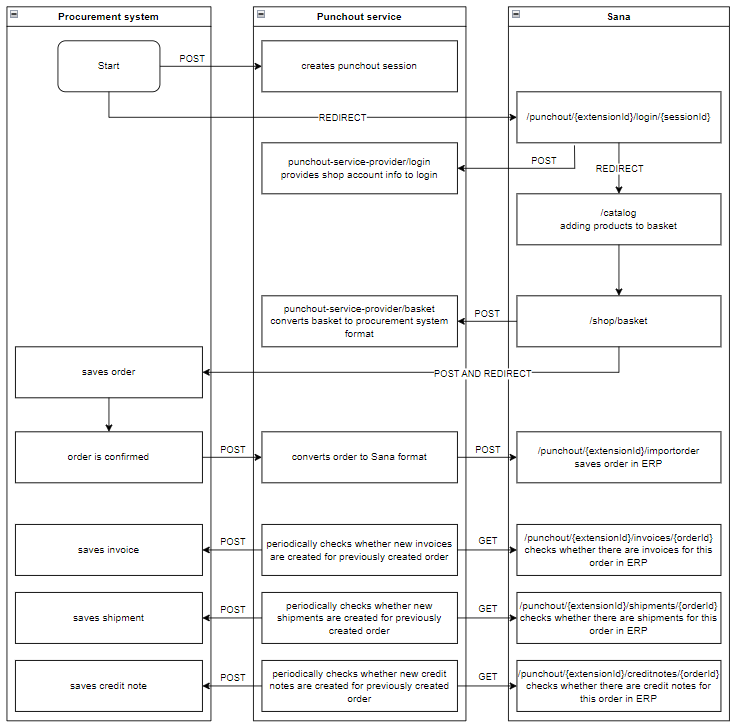
First step is done on the procurement system side: it sends the Punchout Setup Request to the punchout service to initiate a punchout session, and then redirects user to the Sana website including the punchout session ID in the URL.
When user is redirected from the procurement system to Sana, the OnLoginRequestReceivedAsync is called to handle this request. This method should use punchout session ID from the HTTP request query parameters to check in punchout service whether there is such session and retrieve shop account email of user that should be logged in and shopping cart information to prefill (in case of punchout edit). If there is session with such ID, user will be automatically logged in, if not then redirected to the page configured in the LoginErrorPageLink.
Once user is authenticated, completed shopping and clicked on the "Transfer shopping cart" button on the shopping cart page, Sana calls the TransferBasketAsync method. This method should transfer the shopping cart information to the punchout service and return to Sana an instance of PunchoutNextAction with an action identifying what should be done next. For instance how it works with InstaPunchout: Sana sends shopping cart information to InstaPunchout, it prepares the Punchout Order Message and returns it to Sana encoded in base64 string with URL where Sana should post it.
Upon finalizing an order within the procurement system, it sends the Punchout Order Request to the punchout service. Then punchout service sends the import order request to Sana that is handled by the OnImportOrderRequestReceivedAsync method. This method places the order in Sana connected ERP and returns created order details to the punchout service. Punchout service may send the Punchout Confirmation Request to the procurement system.
After order is created the punchout service may periodically call Sana to check whether new invoices are created for that order. Such request is handled by the OnInvoicesRequestReceivedAsync method that gets invoices from Sana connected ERP and returns them to the punchout service. Punchout service sends the Punchout Invoice Request to the procurement system in case of new invoices.
After order is created the punchout service may periodically call Sana to check whether new shipments are created for that order. Such request is handled by the OnShipmentsRequestReceivedAsync method that gets shipments from Sana connected ERP and returns them to the punchout service. Punchout service sends the Punchout Shipping Notice to the procurement system in case of new shipments.
After order is created the punchout service may periodically call Sana to check whether new credit notes are created for that order. Such request is handled by the OnCreditNotesRequestReceivedAsync method that gets credit notes from Sana connected ERP and returns them to the punchout service. Punchout service sends the Punchout Credit Memo Request to the procurement system in case of new credit notes.
Implementation
Start with a new project
Create a new add-on project named "Sana.Extensions.CustomPunchout" as described in the add-on development tutorial.
The "CustomPunchout" constant is the name which will be used in this tutorial, but in real life add-ons, it should be replaced by the name of the punchout service which the add-on integrates with.
Create the extension add-on's class
Create a new class CustomPunchoutExtension inherited from PunchoutExtension.
More information about PunchoutExtension you can find in
PunchoutExtension reference article.
public class CustomPunchoutExtension : PunchoutExtension
{
}
Implement configuration class
This step is optional and is only needed if your extension add-on should have configurable settings that the web store administrator should set in Sana Admin.
Create a new class CustomPunchoutConfiguration inherited from the ExtensionConfiguration and decorate it with ConfigurationKey attribute.
This class will be used by Sana as a view-model to configure punchout extension in Sana Admin. More details about extension configuration class
you can find in the Extension configuration article.
[ConfigurationKey("CustomPunchout")]
public class CustomPunchoutConfiguration : ExtensionConfiguration
{
}
Let's add a StartPageLink property to the CustomPunchoutConfiguration class that may be usefull for the web store administrator to configure.
You can decorate the properties with data annotation attributes since this class is a model for a view.
[ConfigurationKey("CustomPunchout")]
public class CustomPunchoutConfiguration : ExtensionConfiguration
{
    [Display(Name = "StartPageLink")]
    public Link? StartPageLink { get; set; }
}
Implement IConfigurable<TConfiguration> interface in CustomPunchoutConfiguration. Put CustomPunchoutConfiguration class as a generic type
parameter for IConfigurable<TConfiguration>, it will indicate that our punchout extension should be configured with this class.
public class CustomPunchoutExtension : PunchoutExtension, IConfigurable<CustomPunchoutConfiguration>
{
    public CustomPunchoutConfiguration Configuration { get; set; }
}
Sana will initialize Configuration property with configuration settings entered in Sana Admin on the extension configuration page.
This page will be accessible when you go to all installed extensions page in Sana Admin and click "Configure" button of our
"Custom punchout" extension once it gets built and installed in Sana Admin.
Implement PunchoutExtension.PunchoutId property
This property must specify a unique identifier by which Sana will reference this punchout extension in the system.
So let's add PunchoutId property implementation to the class:
public class CustomPunchoutExtension : PunchoutExtension, IConfigurable<CustomPunchoutConfiguration>
{
    public CustomPunchoutConfiguration Configuration { get; set; }

    public override string PunchoutId => "CustomPunchout";
}
Implement PunchoutExtension.GetSettings method
This is optional method to override may be used to change the default values described here.
To implement this method in the extension class first add the needed properties to the extension configuration class to make possible for the web store administrator to configure them:
[ConfigurationKey("CustomPunchout")]
public class CustomPunchoutConfiguration : ExtensionConfiguration
{
    ...

    [Display(Name = "LoginErrorPageLink")]
    public Link? LoginErrorPageLink { get; set; }

    [Display(Name = "ShippingMethod")]
    public Guid? ShippingMethodId { get; set; }

    [Display(Name = "SendOrderConfirmationEmail")]
    public bool IsOrderConfirmationEmailEnabled { get; set; }

    [Display(Name = "LogoutLink")]
    public bool IsLogoutAllowed { get; set; }

    [Display(Name = "SaveNewShippingAddressesToCustomerAddresses")]
    public bool SaveNewShippingAddressesToCustomerAddresses { get; set; }
}
Then implement the method in the punchout extension class and pass values from the extension configuration:
public class CustomPunchoutExtension : PunchoutExtension, IConfigurable<CustomPunchoutConfiguration>
{
    ...

    public override PunchoutSettings GetSettings() => new()
    {
        LoginErrorPageLink = Configuration.LoginErrorPageLink,
        ShippingMethodId = Configuration.ShippingMethodId,
        IsOrderConfirmationEmailEnabled = Configuration.IsOrderConfirmationEmailEnabled,
        IsLogoutAllowed = Configuration.IsLogoutAllowed,
        SaveNewShippingAddressesToCustomerAddresses = Configuration.SaveNewShippingAddressesToCustomerAddresses
    };
}
Implement PunchoutExtension.OnLoginRequestReceivedAsync method
Sana calls this method to handle punchout login request. This method should use punchout session ID from the HTTP request query parameters to check in punchout service whether there is such session and retrieve shop account email of user that should be logged in and shopping cart information to prefill (in case of punchout edit).
Sana calls this method and passes the instance of PunchoutLoginRequestContext with HTTP request information and the method returns an instance of PunchoutLoginInfo with information to login shop account.
See OnLoginRequestReceivedAsync method description for more details and implementation example.
Implement PunchoutExtension.TransferBasketAsync method
Sana calls this method when the user clicks on the "Transfer shopping cart" button on the shopping cart page. This method should transfer the shopping cart information to the punchout service and return an action identifying what should be done next.
Sana calls this method and passes the instance of PunchoutBasketTransferContext with information needed to transfer basket to the procurement system and the method returns an instance of PunchoutNextAction with an action identifying what should be done next.
See TransferBasketAsync method description for more details and implementation example.
Implement PunchoutExtension.OnImportOrderRequestReceivedAsync method
This method places the order in Sana connected ERP and returns created order details to the punchout service.
Sana calls this method and passes the instance of PunchoutImportOrderRequestContext with information needed to handle the import order request.
Make sure that request is authorized to execute this method.
Let's add the ApiAuthorizationKey property to the extension configuration class to make possible for the web store administrator to configure it:
[ConfigurationKey("CustomPunchout")]
public class CustomPunchoutConfiguration : ExtensionConfiguration
{
    ...

    [Display(Name = "ApiAuthorizationKey")]
    [SecureString]
    public string? ApiAuthorizationKey { get; set; }
}
Implement method that compares the HTTP request header value with the value configured in the extension configuration:
bool IsRequestAuthorized(IHttpRequest request)
{
    if (string.IsNullOrEmpty(Configuration.ApiAuthorizationKey))
        return false;

    return Configuration.ApiAuthorizationKey == request.Headers["Authorization"].ToString();
}
Use this method in the OnImportOrderRequestReceivedAsync and return the 401 status code if the request is not authorized:
public override async Task OnImportOrderRequestReceivedAsync(PunchoutImportOrderRequestContext context, CancellationToken cancellationToken)
{
    if (!IsRequestAuthorized(context.Request))
    {
        context.Response.StatusCode = 401;
        return;
    }

    ...
}
See OnImportOrderRequestReceivedAsync method description for more details and implementation example.
Implement PunchoutExtension.OnInvoicesRequestReceivedAsync method
This method gets invoices from Sana connected ERP and returns them to the punchout service.
Sana calls this method and passes the instance of PunchoutInvoicesRequestContext with information needed to handle the invoices request.
Make sure that request is authorized to execute this method:
public override async Task OnInvoicesRequestReceivedAsync(PunchoutInvoicesRequestContext context, CancellationToken cancellationToken)
{
    if (!IsRequestAuthorized(context.Request))
    {
        context.Response.StatusCode = 401;
        return;
    }

    ...
}
See OnInvoicesRequestReceivedAsync method description for more details and implementation example.
Implement PunchoutExtension.OnShipmentsRequestReceivedAsync method
This method gets shipments from Sana connected ERP and returns them to the punchout service.
Sana calls this method and passes the instance of PunchoutShipmentsRequestContext with information needed to handle the shipments request.
Make sure that request is authorized to execute this method:
public override async Task OnShipmentsRequestReceivedAsync(PunchoutShipmentsRequestContext context, CancellationToken cancellationToken)
{
    if (!IsRequestAuthorized(context.Request))
    {
        context.Response.StatusCode = 401;
        return;
    }

    ...
}
See OnShipmentsRequestReceivedAsync method description for more details and implementation example.
Implement PunchoutExtension.OnCreditNotesRequestReceivedAsync method
This method gets credit notes from Sana connected ERP and returns them to the punchout service.
Sana calls this method and passes the instance of PunchoutCreditNotesRequestContext with information needed to handle the credit notes request.
Make sure that request is authorized to execute this method:
public override async Task OnCreditNotesRequestReceivedAsync(PunchoutCreditNotesRequestContext context, CancellationToken cancellationToken)
{
    if (!IsRequestAuthorized(context.Request))
    {
        context.Response.StatusCode = 401;
        return;
    }

    ...
}
See OnCreditNotesRequestReceivedAsync method description for more details and implementation example.
Implement PunchoutExtension.OnProductsRequestReceivedAsync method
This method gets product collection from Sana database and returns them to the punchout service.
Sana calls this method and passes the instance of PunchoutProductsRequestContext with information needed to handle the products request.
Make sure that request is authorized to execute this method:
public override async Task OnProductsRequestReceivedAsync(PunchoutProductsRequestContext context, CancellationToken cancellationToken)
{
    if (!IsRequestAuthorized(context.Request))
    {
        context.Response.StatusCode = 401;
        return;
    }

    ...
}
See OnProductsRequestReceivedAsync method description for more details and implementation example.
Implement PunchoutExtension.OnPricesRequestReceivedAsync method
This method gets product prices from Sana and returns them to the punchout service.
Sana calls this method and passes the instance of PunchoutPricesRequestContext with information needed to handle the prices request.
Make sure that request is authorized to execute this method:
public override async Task OnPricesRequestReceivedAsync(PunchoutPricesRequestContext context, CancellationToken cancellationToken)
{
    if (!IsRequestAuthorized(context.Request))
    {
        context.Response.StatusCode = 401;
        return;
    }

    ...
}
See OnPricesRequestReceivedAsync method description for more details and implementation example.
Implement PunchoutExtension.OnShippingAddressesRequestReceivedAsync method
This method gets shipping addresses from Sana connected ERP and returns them to the punchout service.
Sana calls this method and passes the instance of PunchoutShippingAddressesRequestContext with information needed to handle the shipping addresses request.
Make sure that request is authorized to execute this method:
public override async Task OnShippingAddressesRequestReceivedAsync(PunchoutShippingAddressesRequestContext context, CancellationToken cancellationToken)
{
    if (!IsRequestAuthorized(context.Request))
    {
        context.Response.StatusCode = 401;
        return;
    }

    ...
}
Next steps
After the extension is implemented, follow the regular add-on development guides:
- Test the implemented extension
- Assemble the add-on package
- Ensure that the package has been correctly assembled.
See also
- How-to develop an add-on
- Extension configuration
- PunchoutExtension reference
- PunchoutLoginRequestContext reference
- PunchoutLoginInfo reference
- PunchoutBasketTransferContext reference
- PunchoutNextAction reference
- PunchoutImportOrderRequestContext reference
- PunchoutInvoicesRequestContext reference
- PunchoutShipmentsRequestContext reference
- PunchoutCreditNotesRequestContext reference
- PunchoutProductsRequestContext reference
- PunchoutPricesRequestContext reference
- PunchoutShippingAddressesRequestContext reference